Have you ever observed your Snapchat Map Bitmoji? Have you noticed that your friends’ Bitmoji are performing specific actions like holding a phone or driving a car?
Every time you open Snap Map, it updates your location. If you don’t open the app for a few hours, your Actionmoji disappears from the map.
On the Snapchat map, you and your friends are represented by an Actionmoji. It is a redesigned version of your Snapchat Bitmoji. It’s created to represent a specific user action.
In this article, you’ll know the different Snapchat Bitmoji meanings. You’ll also learn about the actionmoji which shows up on the Snapchat Map.
The Meaning Of Snapchat Map Actionmoji?
Sometimes, you see that your Actionmoji changes. Your friend’s Actionmoji may change too. It shows up driving cars and even on the beach.
Currently, there are many Actionmoji available on Snapchat that depict different actions. The following are some Snapchat Bitmoji and their meanings:
1. Birthday Hat And Balloon Bitmoji

This Actionmoji shows that it is your birthday. Snapchat uses the birth date information you gave when creating your account to show that it is your birthday.
2. Umbrella Above Bitmoji

If your Bitmoji is under an umbrella, it means it is raining. Alternatively, your friends might be in a location where it’s raining.
Using your phone’s geographical position, Snapchat can determine your location, and automatically update your Bitmoji to suit the weather.
3. Z’s Above The Bitmoji

When you notice that your friend Bitmoji has the letters ZZZ, it implies that your friend is asleep.
If you plan to sleep while leaving the Snapchat app running, set your Bitmoji to show that you are sleeping. This will help avoid any disturbances.
4. Battery Above Bitmoji
This Actionmoji shows that your phone has a low battery level. This Actionmoji is usually used to notify your friends that your phone might go off.
5. Green Battery Over Bitmoji
A green battery icon over someone’s head on your Snap Map means their phone battery is fully charged. It indicates the battery is full.
6. Hanging Out With Friends Bitmoji

When Snapchat detects a group of users together, this Actionmoji will appear. The Bitmoji for you and all your friends will appear in a group. They will be shown together at one place. This indicates that you are all at one specific location as a group.
7. Bitmoji Holding A Phone
You see your friend’s Actionmoji on the Snap Map. When you observe that the Bitmoji is holding a phone, it means that they are having a voice call. They might also be having a conversation with someone on the Snapchat App.
8. Listening To Music Bitmoji
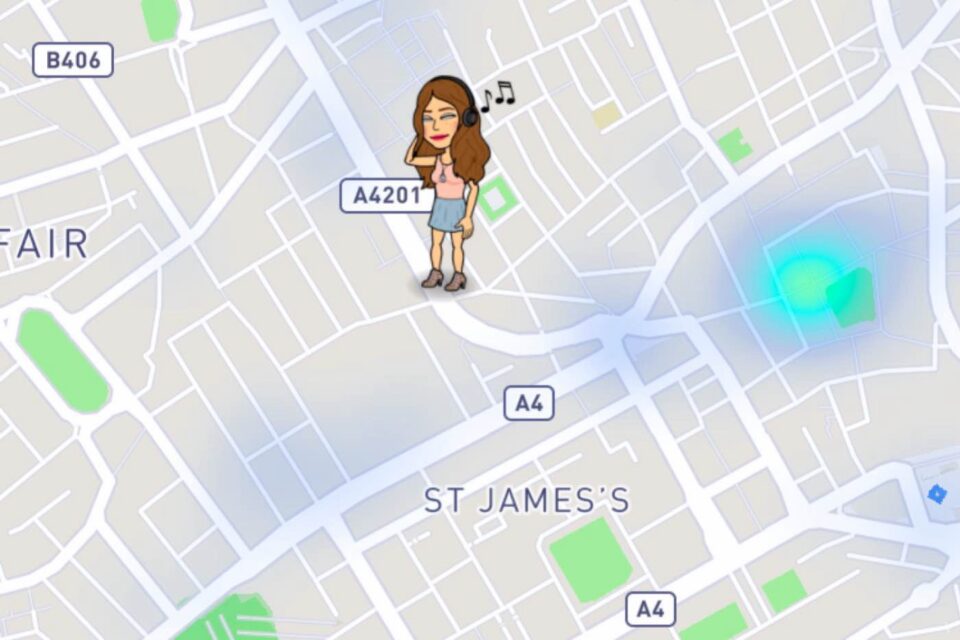
If you listen to music on your phone while Snapchat is running, the Bitmoji will update. It shows that you are currently listening to music.
9. Driving A Red/Yellow Car Bitmoji

Your Actionmoji will display you in a red or yellow car if you are driving. It does not necessarily mean that you are using Snapchat and driving or the color of your car is yellow or red. Instead, Snapchat may be running in the background, and the colour of the car is default.
10. Travelling On A Train Bitmoji

This Actionmoji means that you or another friend is on a train ride. Snapchat can detect when you are near a train station and update the Bitmoji automatically.
11. Flying In A Plane Bitmoji

An Actionmoji flying in a plane means you are traveling by airplane or helicopter. This is an exciting feature Snapchat has that can show your flight progressing in real-time on the Snap Map.
12. Bitmoji In A Boat

If you are in a boat or ship, your Bitmoji will also be in a boat. This Actionmoji is usually updated manually. It may be difficult for Snapchat to confirm that you are actually in a boat.
13. Hanging Out At The Beach Bitmoji

Seeing someone’s Bitmoji playing or having fun at the beach means the person is at the beach.
Snapchat can determine if you are alone enjoying the beach. It can update your Bitmoji to show you relaxing in the sun with a beach towel. Alternatively, it might display you building a sandcastle.
14. Taking A Break With Luggage Bitmoji

A Bitmoji that seems to be resting with luggage in hand shows that the user is around an airport. It indicates they are in an airport. Snapchat uses GPS to determine if you are at the airport and updates your Bitmoji.
15. Playing Golf Bitmoji
When near a golf course, Snapchat adjusts your Bitmoji to represent you playing the game. On the Snap Map, you’ll see your Actionmoji in a golfing suit and swinging a club.
16. Bitmoji Playing Tennis
Once Snapchat determines that you are near or at a tennis court, your Actionmoji will be updated. It will show you playing golf, like the Playing Golf Actionmoji.
17. Attending A Sports Game Bitmoji
Snapchat can determine if there is any sporting activity happening around you. If Snapchat detects that you are attending a sporting event, it will update your Bitmoji. The update will show you enjoying yourself at the game.
18. Rocking Out At A Concert Bitmoji
Snapchat uses GPS to gather data on any huge festival or music concert. When it detects that you are at or around one of these events, it can change your Bitmoji. It automatically updates your Bitmoji to show it having fun at the concert.
19. Taking Pictures At A Tourist Attraction Bitmoji
If you go sightseeing, or visit any tourist attraction, your Bitmoji will appear on the Snap Map. It will be shown with a camera. This indicates that you are enjoying a tour.
20. Ghost Icon Over Bitmoji

If you or your friend has a ghost icon over their Bitmoji’s head, it means your location is kept private. It is not shown to other people using the Snap Map.
Snapchat keeps other users’ locations private. This feature protects your privacy and safety whenever you use the Snap Map.
How To Turn off Snapchat Bitmojis
To turn off Snapchat Bitmoji: Open Settings on your Android device. Click on Apps & notifications. Select App info. Select Snapchat. Select Permission. Click on the Location option. Disable it.
To turn off Snapchat Bitmoji: Open Settings on your iOS device. Scroll down. Select Snapchat. Click on the Location option. Disable it.
You can go Ghost on Snap Map by tapping the Map icon at the bottom left. Then tap the gear icon at the top right [settings]. Finally, enable Ghost Mode.
Conclusion
The Snapchat map is a feature of the Snapchat app. It allows you to share your location with your friends. You can also check their location on the map.
You can navigate the map to even discover what your friends are doing. The Actionmoji tells you where your friends are, or what they’re currently doing.
To know the meaning of the Snapchat Map Bitmoji, read the guide above, which explains each Bitmoji in detail.
FAQs on SnapChat Map Bitmoji Meaning

Can You See Who Viewed Your Bitmoji On Snap Maps?
Unfortunately, there is no way to know who has seen your Snapchat location
Who Can See My Activity On Snap Map?
You can share your location with all your friends, a select group of friends, or no one at all.